Server Tracker
Download the Companion App
A helper app you keep running while playing on PC (emulator). It shows mission / ghost-mission coordinates in a table and auto-uploads your server rankings to the tracker, helping the site.
Latest update — v2.7.6 (2026-08-21)
- Fixed the power chart plunging to zero mid-line — on days when only the alliance member list was collected and the in-game "Total Hero Power" ranking was never opened, hero power was left as no reading (0), so the line appeared to drop to the bottom and jump back. Days without a reading are now skipped and the line simply connects the readings before and after. (The "N days · change" summary at the top counts only real readings too.)
Previous updates (43)
v2.7.5 (2026-08-20)
- Desert War MMR (matchmaking rating) is now recorded as a time series — it used to be stored as a single value per battle, overwritten in place, so you could not tell whether a value was from before or after the battle, or whether it moved because the roster changed. The collector now appends one line per observation together with the time it was seen (immediately when anything changes, and once every 6 hours per team even when nothing does), and also keeps the opponent's MMR, army power, starter count and battlefield (pool) id. For the first time this makes it possible to trace how much MMR moves when you win, lose, or change your lineup.
- Desert War MMR rankings are now grouped by server age — MMR is scaled to the level of your server, so putting old and new servers in one list pushes much weaker servers to the top. By analysing real matchups we confirmed that Desert War opponents are drawn from a pool spanning three consecutive transfer groups, and rank / top-% are now computed inside that pool.
- (FYI) What the collected data shows about Desert War matchmaking — opponents are matched on this MMR value, not on power (across 125 real matchups the two sides' MMR differed by a median of 1%, while power differed by 4.7%). MMR scales roughly with the square of the registered starters' power, so the more and the stronger the members you register, the tougher your opponent gets. A loss visibly cuts the next round's value (about −23%), making the next opponent easier, while a win appears to give little or nothing.
v2.7.4 (2026-08-19)
- Lineup helper reworked (Desert War / Canyon War) — applicants are now split into 20 starters and 10 reserves per team. Hero power is still the base order, but people who signed up last round and were not picked move up, while those who were picked but did not show up move down (how many past rounds count and how strong the adjustment is are tunable right in the tab, and the rules are shown there too). Who was picked is read straight from the in-game roster log; actual attendance is not sent per player, so right-click a member to mark them absent. If a battle had fewer participants than the roster size, a hint tells you how many appear to be missing.
- Server War (Throne War) collection fully retired — the PC app stopped long ago, but the mobile collector still had the handling left in. Neither app now reads or sends any Server War data.
- Optimized for lighter, longer runs — (1) Mobile: the receive buffer is no longer copied on every read, cutting battery and memory use, and the treasure-alarm dedupe cache no longer grows forever. (2) PC: files that were rewritten every few seconds while a screen was open (Desert War MMR, Canyon War backups) are now written only when something actually changed, and the 30-second nickname-cache save is skipped when nothing changed. (3) The huge comparison strings the resource-node and watchlist tabs built every second are gone, and ghost-mission counting now takes a single pass.
v2.7.3 (2026-08-18)
- The Canyon War game-official record now shows on the website too — the game only returns about the last 20 matches at a time, so the detailed count on the web could look smaller than your true total. The collector now also sends the game's official record (total / wins / losses), shown at the top of the web Canyon War page. Each alliance accumulates into its own record and never erases another's.
- Fixed some applicants missing from the Canyon War roster and formation helper — Canyon War reports two kinds of sign-up status (applied / confirmed), and only one was counted as "applied", so confirmed members dropped out of the roster and helper. Both are now counted and placed correctly.
- Added the game's official lifetime record to the Canyon War header — the game only returns about the last 20 matches at a time, so the detailed count the collector accumulates could look smaller than your true total. The official record (total / wins / losses) from the game is now shown in the header, so the real win-loss total is accurate even when only part of the detail is captured. (Detailed matches keep building up the more often you open the screen.)
v2.7.1 (2026-08-14)
- Fixed Desert War "Team A / Team B opponent" tabs showing your own alliance members — the us-vs-them split in the matchup data could flip in some cases, so the opponent tab listed your own members instead of the enemy. It now always treats the side matching your server + alliance as "us", so the opponent tab shows only the enemy alliance. (If the opponent looks empty, open that opponent server's "Total Hero Power" ranking once in-game.)
- Removed the "Total Power" column from the roster board on the Power Chart tab — dropped the column that was easy to confuse with Hero Power, leaving Name, Hero Power, Rank, Growth and Status. The bottom-summary average now uses Hero Power.
v2.7.0 (2026-08-13)
- New Alliance Roster board on the Power Chart tab — pick an alliance to see its members’ power, rank, growth (change vs. the previous reading) and who newly joined or left, all in one table; click a name to open that player’s power-over-time chart. The old “My alliance only” checkbox is now an alliance dropdown, so you can view any alliance, and the server picker now auto-completes as you type — handy when there are many servers. (Open the in-game “Total Hero Power” ranking while collecting to build up the history by date.)
- Per-base shield alarm, 1 minute before expiry — right-click a base in the Shield list and choose “Shield alarm on” to be alerted with sound and a notification when that base’s shield is about to drop (within 1 minute). Alarmed bases are marked with 🔔 and the setting persists across restarts, so you never miss the moment a target opens up.
- Watched-base aliases now survive updates — bases you named and saved could occasionally disappear during a program update; the save method is now crash-safe, so your named watch bases stay put after updating.
- Fixed treasure alarms not firing on the central (neutral) server — during a season, treasures on the central server were silenced because it isn’t your home server; they now alarm as long as they’re on the map you’re currently viewing.
- Power Chart now keeps every server you’ve collected — previously a server’s data was auto-cleaned after about two weeks and dropped off the server list; now each server’s latest snapshot is always kept, so any server you’ve ever collected stays listed. (Records already cleaned in the past can’t be recovered — just reopen that server’s “Total Hero Power” ranking once to re-collect.)
- New Desert War support — split your whole alliance into Team A/Team B by sign-up to see time slots, main/reserve and hero power in one table, with strong no-shows flagged automatically. It auto-aggregates this matchup’s enemy roster power for Team A/B and your full head-to-head history (total W/L, win rate, streaks, per-opponent record), plus a formation helper that splits applicants into two power-balanced teams (adjust by double-click or drag). On the website’s “Battlefields” menu you can browse every recorded alliance’s Desert War record and MMR ranking. (Open the in-game Desert War screen to build up the data.)
- New Canyon War support — auto-accumulates the overall record (total W/L, win rate, streaks) of the 3-alliance matches, with the current roster and an applicant power-balancing helper. On the website’s “Battlefields” menu you can pick an alliance to look up its Canyon War record. (Open the in-game Canyon War screen to build up the data.)
v2.6.3 (2026-08-12)
- Missions & Ghost missions — show only those ending within 1 hour: any mission more than an hour from completion is hidden and reappears automatically once it comes within the hour. Toggle it with the “Within 1h” checkbox on each tab’s filter row (on by default), so only soon-to-finish missions stay in view and the list is far cleaner.
- Keep dropped-shield targets in the list: when a base’s shield expires or is removed, it no longer disappears — it stays marked “Attackable” in green, along with the time it dropped, so you won’t miss an enemy that just became open to attack.
v2.6.2 (2026-08-09)
- Champion War final standings capture — open the in-game Champion War “results” screen and the app now reads the final standings (champion, runner-up, and so on). Champion War news posts whose final match wasn’t captured — leaving the winner blank — are now filled in with the final ranking table and champion. (Just open the screen once; no setup needed.)
- Server War collection stopped — the app no longer collects or sends any Server War (throne) data, and Server War news has been removed from the guide site.
v2.6.1 (2026-08-09)
- Three more languages — Chinese (中文), Japanese (日本語), and Arabic (العربية) are now supported. Pick them from the language selector at the top; Arabic is shown right-to-left (RTL). Six languages in total now, along with Korean, English, and Thai.
- Further speed-up for long sessions — the lists (missions, ghost missions, resource nodes, Zombie Kings, shields, and so on) no longer rebuild in full every second; they refresh only when the order actually changes. Much lighter and more responsive even with many rows piled up.
v2.6.0 (2026-08-08)
- Added a server filter to the Shield tab — the shield list used to mix multiple servers together; now you can narrow it to one server (a server you viewed or searched on the map). It works alongside the alliance filter, and your choice is remembered across restarts.
- Automatic list cleanup — the mission, ghost-mission, resource-node, zombie-king, and shield lists now drop entries not seen again for over an hour, so the app no longer slows down the longer you leave it running. If a list still grows too large, the oldest entries are trimmed first to keep it light.
- New Supporters tab — see the people who support this app right inside it. The list is loaded live from the server.
v2.5.3 (2026-08-06)
- Fixed collection stopping after long uptime — no more restarting the game — after the game had been running for a long time, collection would eventually stop, and toggling the collector off and on wouldn't bring it back — you had to restart the game itself. That root cause is now fixed: the collector re-syncs to the already-running game connection on its own, and if it ever stalls it recovers automatically within a few minutes, so you never need to restart the game.
v2.5.2 (2026-08-04)
- Champion War tournament bracket — open the tournament/matchup (betting) screen in the in-game Champion War, and the app now reads the round-of-32 matchups and match results (win/loss) automatically. The collected results fill in the "Tournament bracket" in the guide-site news, so you can see at a glance how far your server players advanced. (Just open the screen once — no extra setup.)
v2.5.1 (2026-08-04)
- Fixed collection stalling after long uptime — after running for a long time, or after sleep/wake, a Wi-Fi switch or a VPN reconnect, collection would sometimes stop until you manually toggled it off and on. The collector now detects this on its own and re-attaches automatically, so collection keeps running without you having to restart it.
- Long-run stability — so it no longer slows down or stalls when left on all day, temporary data that used to pile up is now cleared periodically, and rare errors during screen refresh no longer halt collection.
v2.5.0 (2026-07-31)
- Redesigned look — the dark theme is now a "gaming dark premium" style (deep navy background with neon accents), and the light theme a soft frosted-glass "glassmorphism" style. Both themes retune the background, cards, lists and charts for a more consistent, more readable look. (The orange brand accent is kept.)
- Refreshed buttons & tabs — the main buttons (Start/Stop, device activation, support, auto Start/Stop) are now rounded with a subtle gradient and gloss, and brighten a little on hover. The top tabs show a gradient and an accent bar under the selected tab, so the tab you are on stands out at a glance.
v2.4.8 (2026-07-29)
- Tidier top bar — settings you rarely change (language, time zone, alarm sound, volume, auto-start, command log) are now tucked behind the ⚙ button in the header. Even when you shrink the window the top bar no longer grows to two rows, so the list area below always stays roomy. Click ⚙ at the top right to change these settings.
- GamsGo top-up discount banner — added below the header (Last War: Survival, up to 49% off), with a one-click referral-code copy button and benefit info (new users 8% off · repurchase 1% off). Collapsible with the ▲ button, and it matches the app language. Topping up through the banner helps keep this free app and the guide site running. (Referral code: FGV2V)
v2.4.7 (2026-07-27)
- Fixed lists not reappearing after a drag-delete — on every list tab (Treasure, Shield, Watched Bases, Lucky Gift, Shining Missions, Ghost Tasks, Relics, Resource Nodes, Zombie Kings), selecting several rows by dragging and then deleting them could leave the list looking empty or stop new rows from being drawn. The rendering method was changed so the list always shows correctly after a delete or refresh.
- Champion-ranking alerts excluded from the Lucky Gift alarm — champion-ranking notices (internal id 20044·20045) that were mistakenly picked up as Lucky Gifts are now excluded.
- Treasure cfg filter — treasure items with a content cfg of 19999 or below are excluded for now (assumed non-treasure items such as suspicious supplies). They no longer appear in the list and do not trigger an alarm.
v2.4.6 (2026-07-26)
- More reliable data sending — fixed occasional send failures, especially when a lot of data was sent at once (for example when opening several rankings quickly). The app now automatically spaces out sends, refreshes stale connections, and retries on temporary network or server congestion, greatly reducing dropped transmissions. (This also helps with the on-and-off device authentication issue.)
v2.4.5 (2026-07-26)
- Player country is now collected — when you open a ranking (Total Hero Power, etc.), each player's country is captured too. The guide site's player rankings and migration finder can now show and filter by country. (Country used to be blank; it fills in from newly collected servers.)
- Lucky Gift / alliance reward labels changed — the way Lucky Gift and alliance reward contents are labeled has been reworked so the reward type and count are easier to read.
- Enemy-kill ranking is now collected — when you open a kill ranking (or any ranking that also shows kill counts), each player's enemy-kill count is captured. It's picked up automatically whenever a kill value is present, regardless of the tab.
v2.4.4 (2026-07-24)
- Zombie Kings killed by others are auto-removed on re-scan — when you re-collect the Zombie Kings list (by panning the map again), kings that other players have already killed are removed from the list automatically. Since a King is usually killed soon after its protection ends, the list now shows only the ones actually still there, so you don't waste a trip to an empty spot.
- Ghost Mission Drone / Skill Medal / Resource filter — the Ghost Missions tab now has Drone / Skill Medal / Resource checkboxes at the top. Show only the reward types you want (unchecked = hidden); your choice is saved for next time.
- Treasure reward reports are now shared — when you report what a treasure contains (e.g. Enhancement Stone, Diamonds, Drone parts) from the Treasure tab, it's collected on the server and shared with everyone. Names other players reported are pulled in automatically when you open the app, so the list shows the real reward name instead of a cfg number.
- Remaining time as minutes and seconds — the Shining Mission, Ghost Mission, and Zombie King lists now show remaining time in the same m/s format as Shields (e.g. 47m 06s), replacing the old decimal "47.1 min". (Sort-by-soonest still works.)
v2.4.3 (2026-07-24)
- Hide protected Zombie Kings — the Zombie Kings list no longer shows kings that are still under protection (the first 10 minutes after they spawn). Once protection ends and they can be attacked, they reappear automatically. (The game's protection flag lingers even after protection lifts, so a fixed 10-minutes-from-spawn rule is used instead.)
- Instant delete, stays deleted (unified across lists) — deleting a row now takes effect immediately in every list, and Watchlist bases, like Shields and Resource Nodes, no longer reappear after you delete them (even on re-click or re-detection). To watch such a base again, clear the whole list to reset.
- Collect nicknames from the profile view — opening another player's profile in-game now collects that player's nickname (plus server and alliance), so players outside the rankings can still be named.
v2.4.2 (2026-07-21)
- Save watched bases with a nickname — right-click a row in the Watchlist and choose [Set/edit alias] to give it a private nickname. Aliased bases are saved and stay in the list even after you close and reopen the app (a new Alias column is added; saved bases show in bold at the top). Clearing the alias unsaves it.
- Delete list rows (single or multiple) — in every list (Treasure, Shield, Watchlist, Lucky Gift, Shining Missions, Ghost Missions, Resource Nodes, Zombie Kings), select multiple rows by dragging or Ctrl-clicking, then press Delete, or use the right-click menu to remove the selected rows (Ctrl+A selects all). Deleted Shields and Resource Nodes won’t reappear when you pan the map again.
- Search players in the Power chart — the Power chart tab now has a search box. Type part of a name (or UID) to filter the player list in real time and quickly find someone in a long list.
v2.4.1 (2026-07-21)
- Server War (Throne War) bracket, auto-collected — log in to the game with the collector running and the 8-server Server War tournament bracket is collected automatically, posted as a [Server War] news item. It records which server faced which and who won each round. (Server War data is only sent at login, so opening the bracket screen alone won’t collect it — you must log in with the collector running.)
- Champion War qualifier scores — opening each Champion War group tab now also collects each player’s qualifier score. These scores appear as a new [Score] column in the [Group draw] table of the Champion War news posts, so you can see the real qualifier standings per group. (Only brackets with collected scores are published as news.)
- Dark theme recolor — dark mode now uses Claude’s dark palette: a warm charcoal background with a clay (coral) accent, instead of the previous cool navy + orange. The window title bar, tabs, buttons, lists and the power chart all follow the new tone.
v2.4.0 (2026-07-19)
- Champion War group draw, auto-collected — open each Champion War group tab and the group rosters (100 per group) are gathered automatically, adding a [Group draw] section to the Champion War news post. It lists each group’s top 20, the server spread (top 100 and top 10), seed status, and each group’s rank-1 player (total hero power). Power is filled by joining the data collected from each server’s [Total Hero Power] tab via UID (not name) for an exact match. (The group draw screen has no group number, so the A–P labels in the news are assigned in collection order.)
- Dark theme — a new [🌙 Dark] button in the header switches between light and dark instantly. Dark mode matches the lastwarhub site (dark background + orange accent) and also darkens the window title bar. Your choice is saved across restarts.
- New skin — the header now uses the site logo style (LASTWAR HUB + orange accent line), and tabs, buttons, list headers and the power chart share one flat, modern design. The selected tab is marked with an orange underline.
- Better tab visibility — when the window is narrow and tabs wrap to two rows, every tab now has a boxed outline, so tabs on the upper row (e.g. Auto-click) are clearly recognizable.
- Dark theme details — dropdowns (combo boxes), list headers, right-click menus and status colors (urgent red, amber highlights, etc.) are all drawn in dark colors too.
- Fixed the device-auth button not opening the browser — when the app runs as administrator, pressing [Device auth] sometimes failed to open the activation page. It now opens reliably, and if it ever fails the activation URL is copied to your clipboard so you can just paste it into your browser.
v2.3.1 (2026-07-18)
- Shield tab alliance filter — a new alliance dropdown above the shield list lets you show only one alliance's shields. The dropdown fills itself with the alliances seen in the list; default is [All alliances].
- Zombie King level filter & better sorting — the Zombie King tab now has per-level checkboxes so you can show only the levels you care about (same style as the Shining Mission filter; only levels that actually appear are listed). The list is sorted by level (highest first), then by time to despawn (soonest first).
- High-resolution layout optimization — the top settings rows now wrap automatically to the window width, so buttons and options are no longer cut off on 150%/200% scaled monitors or in narrow windows.
- Filters are now remembered — the Zombie King level checkboxes and the shield alliance selection are saved, so your last filters survive an app restart (same as the Shining Mission filter).
- Smoother shield list — instead of redrawing the whole list every second, rows are now updated in place, so your selection and scroll position no longer jump.
- Shield expiry highlighting — shields expiring within 30 minutes turn orange, within 10 minutes red (bold), so you can spot soon-to-drop shields at a glance.
- Tabs wrap to two rows — when the window is narrow or the display scale is high and the 11 tabs no longer fit on one line, they wrap to two rows automatically (no more scrolling through tabs with arrows).
v2.3.0 (2026-07-17)
- New Zombie King tab — pan the game world map and the Zombie Kings that come into view are gathered into a list with their coordinates, level, owner, and time remaining until they despawn. Levels are shown from 5 to 150, and double-clicking a row moves the game to that coordinate. Right-click or press Delete to remove entries individually.
- Fixed intermittent reception drops — fixed an issue where data reception would intermittently stop after switching servers or moving between screens. The app now auto-detects the game reconnecting and re-locks onto the stream, and drops fewer packets during traffic bursts for more stable collection.
v2.2.1 (2026-07-15)
- Champion War schedule auto-collection — open the Champion War tab once and the 16 participating servers plus that group's audition/round schedule are gathered automatically, then published as a per-group Champion War schedule post in the site News. The schedule updates itself as rounds progress.
v2.2.0 (2026-07-15)
- High-resolution display support — fixed blurry, upscaled text and window on 150%/200% scaled monitors (per-monitor DPI). It now renders crisply at any resolution.
- Improved UI readability — larger base font, roomier top-bar row heights and spacing, and a bigger default window make the lists and buttons easier to read.
- Automatic game-network detection — the new [⌕ Auto-detect] button briefly checks every network and picks the adapter that actually carries the game traffic, then starts. It catches cases that name-matching missed (emulator, PC hotspot), and remembers the adapter that worked so it is auto-selected next time.
- Clearer "Not receiving" diagnosis — the capture status now shows the packet count and game-data count. You can now tell the cause at a glance: (1) "0 packets" = no traffic on this network → make sure the game (phone) is on this PC's hotspot, or pick another [Network]; (2) "N packets but no game data" = this adapter is not carrying the game traffic → switch [Network] above. Note: if the phone is on a router Wi-Fi or cellular, its traffic never crosses this PC and cannot be captured — connect the phone to this PC's hotspot.
v2.1.1 (2026-07-15)
- Fixed "Not receiving" after an update — after an auto-update the app could relaunch without administrator rights, so the network interfaces still showed but no packets were captured ("Not receiving", red). Now the app always runs as administrator however it is started (auto-start · update relaunch · manual launch). Note: if you hit this, please download this version once from the site and run it manually.
v2.1.0 (2026-07-15)
- Treasure contents now sync to the server — previously the treasure contents you reported stayed only on your own screen and were not shared with others. Now your reports are gathered on the server, so every user sees them when they open the app.
- Champion Duel (server tournament) coverage — once the Champion Duel begins, the qualifiers (128 players) → round of 32 → tournament progress is compiled into news on the site. Open the Champion Duel tab with the collector and the entrant and result data is gathered automatically.
v2.0.0 (2026-07-14)
- New Resource Nodes tab — pan the in-game world map and the empty resource nodes you find (Iron · Food · Gold, Lv 8–12) are collected in the [Resource Nodes] tab. Nodes already being harvested by someone are excluded, and you can filter by level (8–12). The list accumulates, so it does not disappear when you move the map.
- Double-click to jump to a coordinate — double-click a row in the Resource Nodes · Treasure · Shield · Watchlist · Shining Mission · Ghost Mission · Relic lists and the game moves to that coordinate (coordinate search → enter → go).
- Move setup (top bar) — before using double-click move for the first time, click the [Move setup] button at the top and set the positions of the game's coordinate-search · X · Y · Go buttons once. As you hover each button, a countdown shows over the game screen so you can follow along.
- Treasure contents shown — the reward column in the treasure list now shows what the treasure holds (e.g. Enhancement Stone). Treasures not yet identified are shown by number (#25114).
- Report treasure contents — for a treasure whose contents are not known yet, tell us with [📣 Report content]. Your report shows on your screen right away and helps everyone.
- More accurate treasure alarm — fixed treasures from other servers ringing by mistake; now only your own server's treasures alert.
v1.7.0 (2026-07-12)
- Auto-update fixed for non-ASCII paths (Korean/OneDrive) — auto-replace-then-relaunch failed when the path contained Korean characters (e.g. Desktop, OneDrive); the updater is now PowerShell-based and handles such paths. Note: v1.6.3's auto-update is affected by this bug, so please download this v1.7.0 manually once from the site; auto-replace works even on non-ASCII paths from the next version on.
- Accounts outside top 200 can now be identified — accounts that weren't detected because they rank outside the top 200 in the Total Hero Power ranking can now activate. Open the [Total Hero Power] ranking in-game; if you're outside the top 200, a prompt appears. Follow it and open [My Profile] once, and you'll be identified automatically and features unlock. (Opening someone else's profile does not work, so it's safe.)
- Server number in the Shield tab — the shield list now shows the server number in front of each coordinate.
- New app icon — the program icon is now the lastwarhub icon.
- Automatic data-folder cleanup — old snapshots and diagnostic logs are cleaned up automatically, so the data folder stays tidy over time.
v1.6.3 (2026-07-12)
- Auto-update fixed — "auto-replace" failed when the install path contained Korean/Thai characters (e.g. the Desktop). Note: v1.6.2's auto-update is affected by this very bug, so please download this v1.6.3 manually once from the site; auto-replace works normally from the next version on.
- Flicker fixed on all tabs — following the Watched Bases fix in the last version, every remaining list tab (Missions, Ghost Tasks, Treasure, Shield, Lucky Gift, Relics) no longer flickers on refresh. Lists now render smoothly, making it easier to select and remove rows.
v1.6.2 (2026-07-11)
- In-app auto-update — no more downloading from the site and deleting the old file by hand. Click the new-version banner at the top of the app and it downloads the new version, replaces the old file, then closes and relaunches into the new version automatically. (Download this version manually once; after that a single click replaces it automatically.)
- Per-alarm control — turn Treasure · Lucky Gift alarms on/off individually. The alarm-sound · toast master switches were removed; each enabled alarm notifies with both sound and Windows toast.
- Treasure alarm — now always alerts only for your alliance's treasures (removed the 'my alliance only' checkbox).
- Attack alarm removed — the base-under-attack alarm was removed.
- Watchlist flicker fix — fixed the list constantly flickering, which made items hard to select or remove.
v1.6.1 (2026-07-11)
- Reception fix — fixed 'Not receiving' still showing on some setups after installing Npcap. Capturing only a specific port could miss the game connection depending on server · region, so it now looks for game traffic across all connections again.
v1.6.0 (2026-07-10)
- Attack alarm — alerts with sound · Windows toast when your base is under attack (shows durability · remaining shield). Includes an on/off switch, and it only notifies (no clicking), so it never manipulates the game.
- Shield tracker — shows shielded bases you have seen on the world map in the [Shields] tab, sorted by soonest expiry (name · alliance · time left · expiry). See at a glance when an enemy shield will drop.
- Watchlist — click a base on the world map to add it to the [Watchlist] tab. It keeps tracking that base by uid even if it moves, and [Find coords] copies the latest coordinate so you can paste it into the in-game go-to.
v1.5.0 (2026-07-10)
- Relic coordinates — Season 2 Scattered Supplies and Season 3 Desert Artifact coordinates are now built into the app. Pan the in-game world map and the undug relic coordinates in the area you are viewing appear in the [Relic Coords] tab, nearest first (pick S2 · S3 in the tab).
- Mark as dug — clear relics you have already dug with [Dug (remove)] and they will not show again (saved permanently). Undo with [Reset dug list].
- Support button — added a button at the top of the app that opens the support page.
v1.4.2 (2026-07-09)
- Fixed an issue where Shining Missions sometimes failed to show up because packets dropped intermittently when switching servers. It now recovers automatically without stopping and restarting the app.
v1.4.1 (2026-07-09)
- Auto Click on/off switch — added an enable checkbox to the Auto Click tab. It defaults to off, and while off the F9/F10 global hotkeys are not registered at all — so auto-click no longer runs just from having the app open.
v1.4.0 (2026-07-09)
- Shining Mission level filter — in the mission tab, check only the levels (1–7) you want to see. Your choice is saved across restarts.
- Treasure alarm fix — the alarm no longer rings for treasures on other servers while you browse their map (e.g., hunting Shining Missions). Only your own server triggers it.
- Newer-server mission fix — level 1–4 Shining Missions on newer servers were missing from the list because only levels 5–7 were recognized. All levels now show.
- Newest servers included — servers not yet in the static list get an estimated open date, so they are included in the Shining Mission server guide.
v1.3.1 (2026-07-08)
- Removed the Medal of Courage notice from the Lucky Gift alarm.
v1.3.0 (2026-07-07)
- Alarm sound & volume — choose the default alarm, a system sound, or your own file (wav/mp3), and adjust the volume.
- Run at Windows startup & start in tray — launch automatically on boot and sit quietly in the tray.
- Power chart — view the hero-power rankings you’ve collected as a chart over time (power · rank trend, by server & player).
- Auto Click — a left-click auto-clicker with F9 start / F10 stop and adjustable clicks-per-second.
v1.2.1 (2026-07-06)
- Fixed a bug where Golden Task Force notices were included in the Lucky Gift alarm.
v1.2.0 (2026-07-04)
- Shining Mission server list — shows at a glance which servers (yours + your transfer group) had missions today and yesterday (3-day cycle per server, ★ = your server).
v1.1.0 (2026-07-03)
- Treasure alarm — sound + Windows toast + coordinate list when a treasure spawns on the world map.
- Lucky Gift alarm — detects alliance Lucky Gifts and logs the sender & reward (your alliance only).
- Alarm sound & Windows toast — toggle each independently; even if you can’t hear the sound, the toast shows it.
- My character info — shows alliance · server · hero power · rank (updates when you open the Total Hero Power ranking).
- Token-expiry warning 5 minutes ahead — sound/toast so you don’t miss re-authentication.
- Receive status — if no data is coming in, it tells you to change the [Network] above and restart.
- Auto update check — if a new version exists, a banner appears at the top of the app linking here.
Why contribute?
- Free — both the app and the site data are free. One device activation unlocks everything: coordinate tools, alarms, battlefield records.
- A win-win data exchange — while you play, rankings are collected automatically and fill the site; you then pull that pooled data back out for free. Using it is contributing, and the more people join in, the more there is to see.
- Records you cannot keep alone — power trends, alliance rankings, Desert War and Canyon results that the game shows briefly and then discards keep piling up, and get denser as more players take part.
What it does
- Auto-collect — opening the Alliance Power Ranking / Total Hero Power tab in-game auto-registers those rankings to the tracker, helping the site.
- Mission coordinates — shows Shining Missions (dispatch) and Ghost Missions (drone parts, etc.) coordinates and remaining time in a table.
- Treasure alarm — when a treasure spawns on the world map, it alerts with sound · Windows toast and lists the coordinates (detected while the world map is on screen).
- Lucky Gift alarm — when an alliance member sends a Lucky Gift (diamonds · honor medals · UR shards, etc.), it alerts with sound · toast and logs the sender and reward (your alliance only).
- Shield tracker · expiry alarm — shielded bases you have seen on the world map are listed by soonest expiry (server · alliance filters). Right-click a base you are watching to arm an alarm and you get a sound · toast one minute before its shield drops. Bases whose shield already dropped stay in the list, marked green as "attackable".
- Watchlist — click a base on the world map to add it to the watchlist; even if that base relocates, it is tracked by uid to the latest coordinates. Give it an alias and it is saved across restarts.
- Zombie King tab — pan the world map and the Zombie Kings in view are listed with coordinates · level · owner · time remaining until they despawn (level filter supported). Right-click or press Delete to remove entries individually.
- Resource-node tab — empty resource nodes (iron · food · gold, level 8-12) found on the world map are collected by coordinate (level filter supported).
- Relic coordinates — Season 2 scattered supplies and Season 3 desert relics are built in: pan the world map and the undug relics in the current area are listed nearest-first (dug-up marks are saved).
- Power chart · alliance member board — pick a server and alliance to see every member’s hero power · rank · growth (change vs the previous record) · joins and leaves in one table; click a name for that player’s power trend graph.
- Desert War helper — shows the current matchup, countdown and the opposing alliance’s strength, and splits sign-ups into 20 starters / 10 subs per team (order auto-adjusted from past sign-up and attendance history; drag or double-click to adjust manually). Past results and MMR changes are recorded too.
- Canyon record — cumulative results of the 3-alliance match (wins/losses · win rate · streak) are accumulated automatically and shown alongside the game’s official totals. The same half-and-half team helper is included.
- Double-click to move — double-click a row in the Zombie King · resource · treasure · shield · watchlist · mission · relic lists and the game jumps to that coordinate (one-time [Move setup] required).
- Auto-click — mouse auto-click started with F9 and stopped with F10 (clicks-per-second adjustable).
- Champion War auto-collection — open the Champion War tab and the participating servers · audition · round schedule are gathered automatically and compiled into the site News.
- Multi-language & time zone — Korean / English / Thai / Chinese / Japanese / Arabic; mission end times shown in your chosen time zone (default: your region).
1. Download
Requirements
- Windows 10/11
- Npcap (packet capture · npcap.com — the app prompts to install)
- Game running on this PC (emulator)
2. Run · activate · use
- After installing, if a warning asks you to install Npcap, click [Yes] to install it, then restart the app.
- First switch the app to your language. Settings open from the gear (⚙) button at the top right.

- After restarting with Npcap installed, click [Device auth] — an activation page opens in your browser.
- Check the code shown on the page and click the [Activate] button.
- Activating issues a 3-hour token (when it expires, click [Device auth] again to renew). Then press the auto-detect (🔍) button to find your network and click [Start].
![Click to enlarge Activating issues a 3-hour token (when it expires, click [Device auth] again to renew). Then press the auto-detect (🔍) button to find your network and click [Start].](/img/guide-autodetect.png)
- Launch the game — if the status shows "Receiving", everything is working. (If it says "Not receiving", click [Stop], change the [Network] at the top and start again.)
- In the in-game Rankings screen, open the [Total Hero Power] tab or tap your own profile — this is required for the app to learn your uid and alliance.
- When your character, alliance and server appear like below, they were picked up correctly.
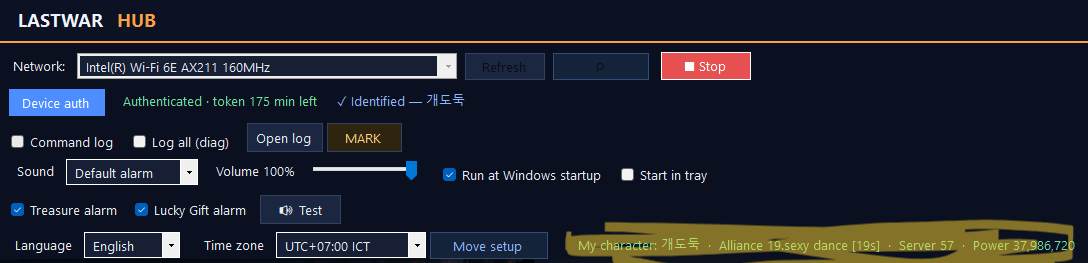
- The treasure alarm fires when a treasure spawns on the world map on your alliance’s side.
- The Lucky Gift alarm fires when an announcement says an alliance member obtained an item that can send a Lucky Gift.
- To pick up Shining Mission / Ghost Mission coordinates, zoom the world map in until gathering spots and bases are visible (like below), then pan around.
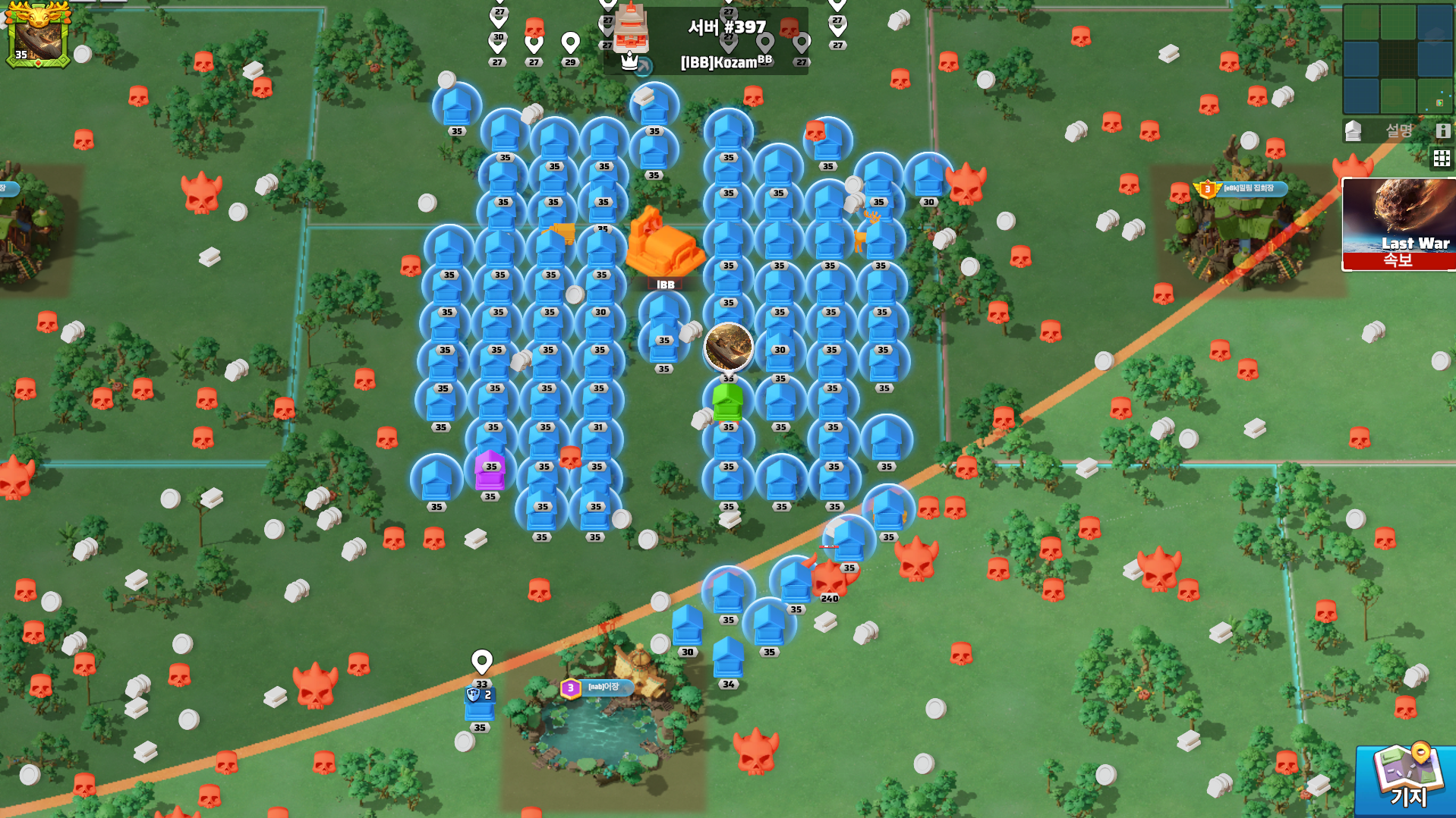
- That is it — every feature is now free to use.
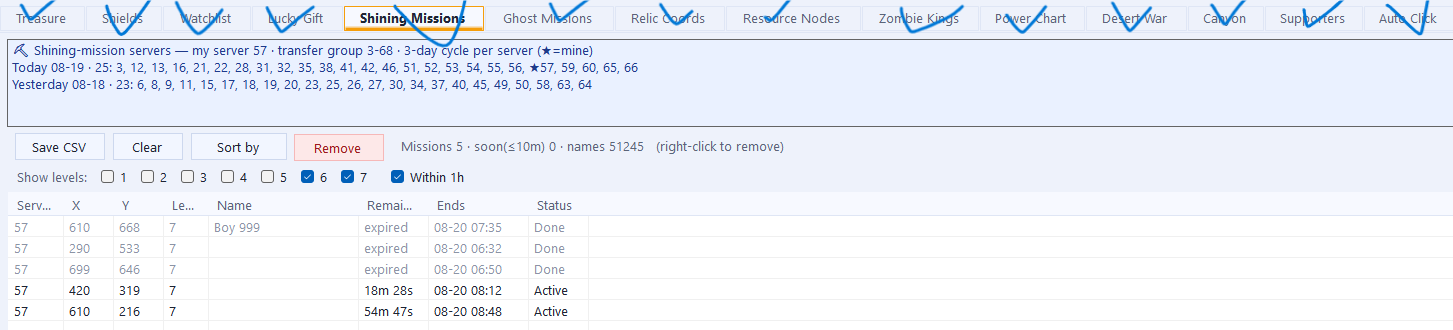
- Example: the Desert War team helper.
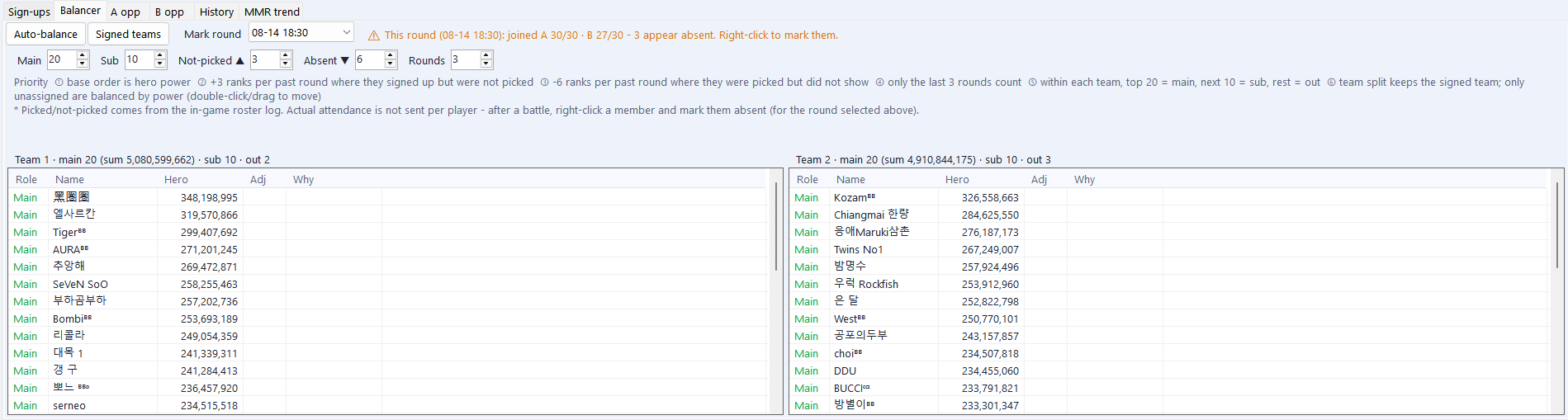
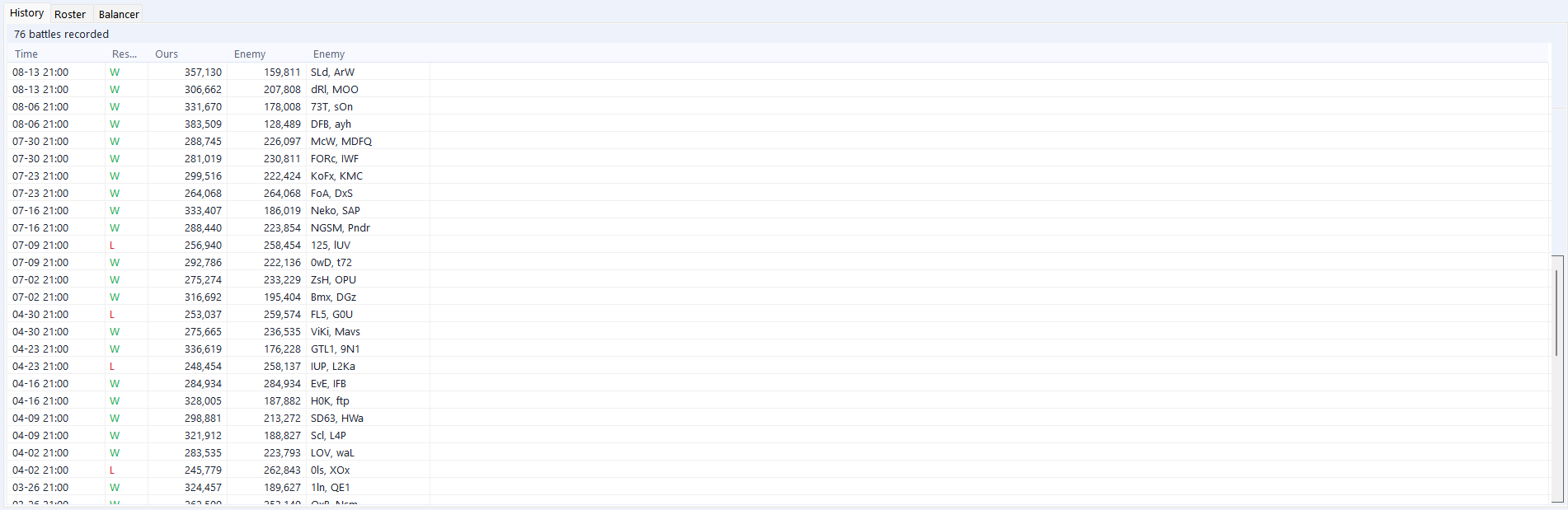
- Example: the Canyon battle record.
- Note: to jump to a coordinate by double-clicking a row, you must run [Move setup] once — with the game window visible, hover the mouse over the coordinate search, then the X box, the Y box and the move button in order; each has a 3-second countdown and saves the position where your mouse is.
![Click to enlarge Note: to jump to a coordinate by double-clicking a row, you must run [Move setup] once — with the game window visible, hover the mouse over the coordinate search, then the X box, the Y box and the move button in order; each has a 3-second countdown and saves the position where your mouse is.](/img/guide-move-setup.png)
![Click to enlarge Note: to jump to a coordinate by double-clicking a row, you must run [Move setup] once — with the game window visible, hover the mouse over the coordinate search, then the X box, the Y box and the move button in order; each has a 3-second countdown and saves the position where your mouse is.](/img/guide-move-search.png)
Device activation page
The app’s [Device auth] button usually opens this page for you. To open it manually:
Go to device activation →What it sends (privacy)
The app sends only in-game public leaderboards (alliance and total-hero-power rankings). It does not handle screenshots, images, or personal data, and uses no game-manipulating macros, bots, or unofficial APIs. It is free.
